Calibrate level
The help for this page of the Version 2 transmitter, in its newest words. A transmitter on V2 B92 or older shows older words.
On the transmitter: Model setupRotorflightCalibrate
Teaches the flight controller which way is level, for self-levelling and rescue. The same in every bank ('All banks' at the top left).
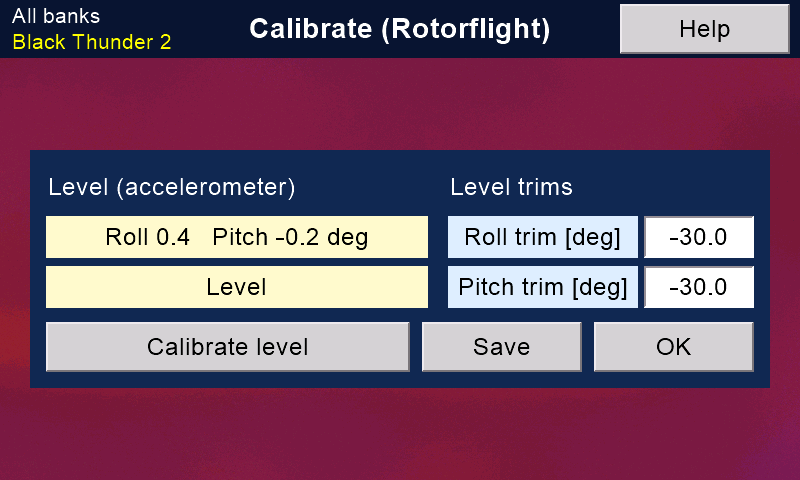
It needs the safety on (model disarmed) and a Version 2 receiver with Bluetooth. 'Calibrate level' and the live level need the model connected.
With no model, the level trims can still be changed in the model's backup on the card, if one was made. The change is then offered to the model when it next connects.
To calibrate the level
- Stand the board (or the helicopter) flat and perfectly still.
- Tap 'Calibrate level' and answer 'OK'.
- Keep it still for a few seconds, until it says Calibrated.
The new level is then stored in the flight controller.
Best done on a flat desk, before the board goes into the model:
a helicopter rarely sits truly level. With the board flat, its plugs may face the front or the back: it makes no difference.
The level lines
They show the roll and pitch the flight controller sees, live.
The second line says Level when both are within 2 degrees.
Just after a calibration, both read near 0.
Level trims
Small corrections, in degrees, to the level that self-levelling and rescue aim for (-30 to 30, one decimal).
Tap a number to type a new one.
A switch or knob can change them in flight too, with 'Adjustments ...' on the Rotorflight options page.
'Save' appears once a trim is changed. It writes the trims to the flight controller, stores them there and reads them back.
'OK' leaves; if a change was not saved, it asks first.
It waits while a calibration or a save is running.
Still stuck?
See common questions, or write to mmessiter@gmail.com. Say which page, and what the screen showed.