System
The help for this page of the Version 2 transmitter, as its latest update shows it. On the transmitter, Animation at the top of this help page plays a short film of the page in use.
On the transmitter: Transmitter setupSystem
System: three pages of settings for the transmitter itself.
Press 'OK' on each page you change:
it saves that page and goes back to Transmitter setup.
'Next >' and '< Back' move between pages, but may lose changes.
General (1 of 3)
'Automatic model selection (AMS)': when a model connects, the model memory that holds its ID is loaded.
If none holds it, you are asked whether to store it with the model now loaded.
'Cancel' stores nothing, and the model does not connect.
With AMS off, the loaded memory stays, whichever model connects.
So load the right model memory before you switch the model on.
Store each model's ID on Model setup > 'Model IDs'.
'Screen goes dark after' (seconds):
the screen turns off to save battery, even in flight.
Touch the screen anywhere to switch it back on.
'Switch off when unused for' (5 to 60 minutes):
switches off a transmitter left on by mistake.
It never switches off while a model is connected.
Touching the screen starts the count again;
moving a stick does not.
'Transmitter battery low at' (10 to 100 %):
warns you when the transmitter battery falls this low.
To be safe, set it quite high.
The model's warning is 'Stop flying volts (per cell)' on Model setup > 'Options'.
'Stick mode' (1 or 2): set this first.
After a change, calibrate the sticks and the trims again.
'Owner's name': shown at the top left of the front screen.
Binding (pairing a receiver with this transmitter)
- Get the receiver ready to bind:
- a new Version 2 receiver is ready already;
- a bound Version 2 receiver:
'Clear bind & restart' on its 'Bind' page (phone app or web page); - a Version 1 receiver: switch it on with its bind plug in.
- With no model connected, press 'Bind' (it changes to 'Stop binding').
Or keep holding the power button as you switch on:
after 2 seconds it says 'Binding enabled' (loud enough even with the volume at 0) and every front screen shows it.
Holding on longer is safe: a hold kept from switch-on never switches off. Let go: the light blinks while binding is on. - The receiver binds and connects.
Binding then stops by itself.
A bound receiver connects only to its own transmitter.
Clock (2 of 3)
'+' and '-' change each part of the date and time, at once.
The clock also sets itself:
- from the internet when the screen is on WiFi (UK time, summer time included);
- from your phone, through a Version 2 receiver;
- from GPS in the model (GMT).
'Time zone (hours from GMT)': hours added to the time shown here, on the front screen and in the logs.
GPS sets the clock to GMT: with GPS, set your time zone here.
Leave it at 0 if the clock already keeps your local time.
'Reset clock' sets the clock to the date and time this firmware was built.
You are asked first.
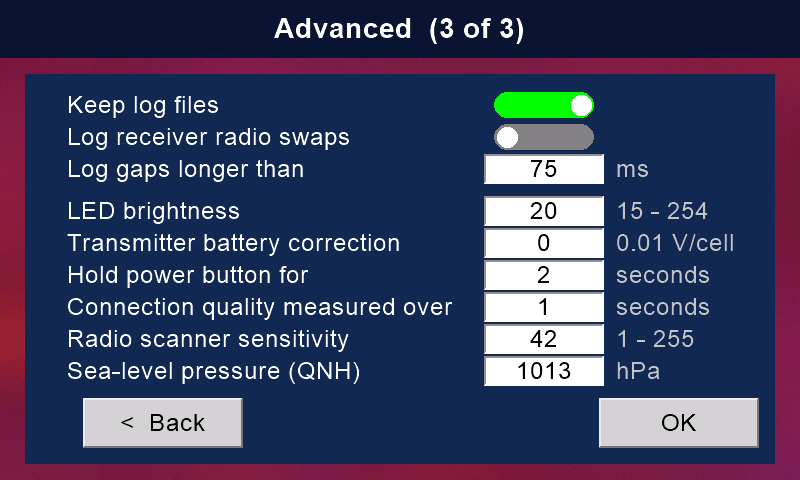
Advanced (3 of 3)
'Keep log files': writes a log of each session on the card.
Read it on Model setup > 'Log'.
'Log receiver radio swaps':
logs each time the receiver changes to another of its radios.
'Log gaps longer than' (10 to 255 ms):
logs each gap in the link this long or longer.
These two work only with 'Keep log files' on.
'LED brightness' (15 to 254): the transmitter's coloured light.
'Transmitter battery correction' (0.01 V per cell, 0 to 20):
if the transmitter battery reads lower than an accurate voltmeter, enter the difference per cell.
The model battery's correction is on Model setup > 'Options'.
'Hold power button for' (1 to 10 seconds): with a model connected, hold the power button this long to switch off.
The front screen counts down.
With no model connected it switches off at once.
'Connection quality measured over': has no effect now.
The quality bar always counts the last 200 data packets.
'Radio scanner sensitivity' (1 to 255):
how slowly the bars of 'Scan RF' fall back.
Higher keeps them up longer.
'Sea-level pressure (QNH)' (hPa):
today's air pressure at sea level where you fly.
It makes altitude readings from a BMP280 barometer in the model more accurate, if one is fitted (a Version 2 receiver has none).
Aviation web sites give it for nearby airports.
Still stuck?
See common questions, or write to mmessiter@gmail.com. Say which page, and what the screen showed.