Calibrate the sticks and switches
The help for this page of the Version 2 transmitter, in its newest words. A transmitter on V2 B92 or older shows older words.
On the transmitter: Transmitter setupCalibrate
Calibration teaches the transmitter where its sticks and switches end and centre, and which way its trims work.
Do it before you set up and fly: it is critically important!
Do it again after new gimbals or a change of stick mode.
New transmitter, or a new owner?
Start with 'Reset transmitter' (see Reset transmitter below).
The page will not open while a model is connected.
Do not switch the transmitter off while calibrating!
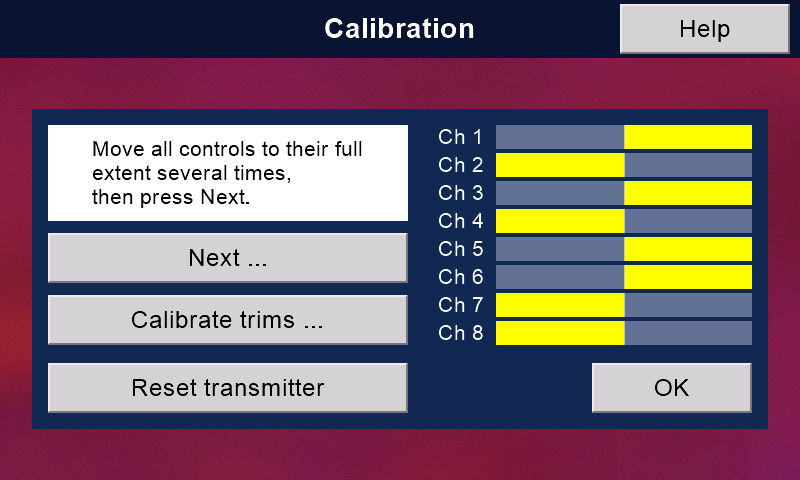
Sticks and switches
Calibrate channels 1 to 8, the top edge switches and the trims.
Nothing else needs it.
Channels 1 to 4 are the two sticks;
channels 5 to 8 are the four front switches or knobs.
- Press 'Calibrate sticks etc.'
- Move both sticks, and the front switches or knobs, to all their extreme positions several times.
Then press 'Next'. - Centre the sticks (the throttle stick too) and the front switches or knobs.
Push all four top edge switches AWAY from you, not in the middle.
The box says back or forward:
always use away, so each switch works the right way round.
Then press 'Finish'.
This records the centres, and which way each top switch works.
The box then says 'Calibration saved.'
and the button 'Calibrate again'.
Once you have started, go on to 'Finish' before you press 'OK'.
The bars 'Ch 1' to 'Ch 8' grow from the middle as you move each control.
Trims
'Calibrate trims ...' opens 'Set trim directions'.
Push each trim button the way the page asks, one at a time, in any order:
aileron RIGHT, elevator DOWN, throttle DOWN, rudder RIGHT.
Each line then says '... trim: done'.
'OK' goes back to Calibration.
If you skip this, a trim might work backwards!
Reset transmitter
For a new transmitter or a new owner. You are asked first.
It takes a few minutes.
It deletes all model memories (but NOT their backup files).
It puts most transmitter settings back to their defaults.
The clock goes back to the date this firmware was built.
Set it again on the Clock page: 'System', then 'Next >'.
Or let it set itself over WiFi.
The reset sets stick mode 2.
Fly mode 1? Set 'Stick mode' in 'System' BEFORE you calibrate.
Still stuck?
See common questions, or write to mmessiter@gmail.com. Say which page, and what the screen showed.