Mixes
The help for this page of the Version 2 transmitter, in its newest words. A transmitter on V2 B92 or older shows older words.
On the transmitter: Model setupMixes
A mix makes one channel (the slave) follow another (the master):
rudder that follows the ailerons, say.
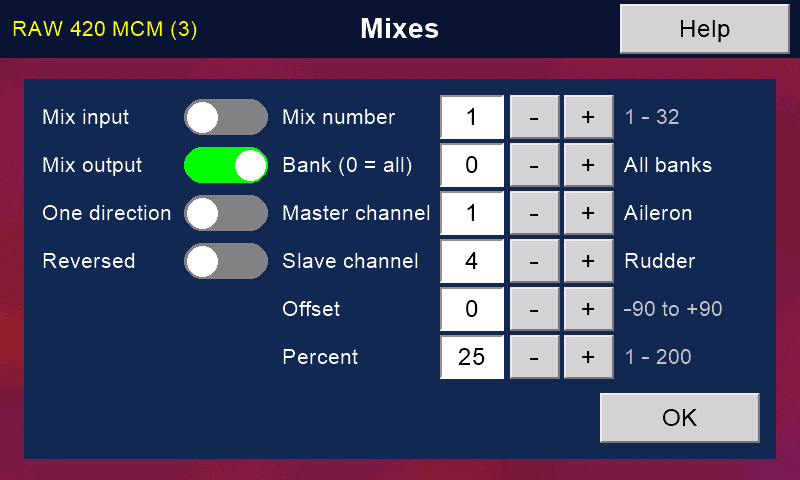
To set up a mix
- Choose a 'Mix number' with its '-' and '+'.
- Turn on 'Mix input' or 'Mix output' (see below). With both off, the mix does nothing.
- Set 'Bank (0 = all)', 'Master channel' and 'Slave channel'.
Their names show on the right. - Set 'Percent': how much of the master's movement the slave gets (100 = all of it).
- Press 'OK' to save.
Each '-' or '+' works at once: watch the servos as you go.
Mix input or mix output
'Mix input' adds the master's stick movement to the slave's stick, before the slave's curve.
The slave's own curve then shapes the result.
'Mix output' adds the master's output (after its own curve) to the slave's output.
Either way, the slave still follows its own stick or knob through its own curve.
It never goes past that curve's end points.
Masters and slaves
A master can have many slaves; a slave can have many masters.
A slave can even have its own master as its slave, as V tails, flaperons and delta wings need. Use 'Mix output' for these.
Output mixes do not pass anything on: each one takes the master's own output, never what another output mix added to it.
Input mixes work in 'Mix number' order, so a later input mix sees what an earlier one did.
One direction and reversed
'One direction' moves the slave one way only, whichever way the master moves: up elevator with left AND right rudder, say.
'Reversed' moves the slave the other way.
With 'One direction' on, 'Reversed' chooses which way.
Offset
Use 'Offset' when the master does not rest at its centre, as with a throttle.
Try values until the slave is centred with the master at rest.
If you change 'Percent', check 'Offset' again: the value needed changes with it.
Still stuck?
See common questions, or write to mmessiter@gmail.com. Say which page, and what the screen showed.