Reconnection times (Gaps)
The help for this page of the Version 2 transmitter, as its latest update shows it. On the transmitter, Animation at the top of this help page plays a short film of the page in use.
On the transmitter: Model setupTelemetryGaps
How long the radio link took to come back each time it was lost, sorted by length: a quick way to judge the link.
Look at it after landing, before you switch off. Not while flying!
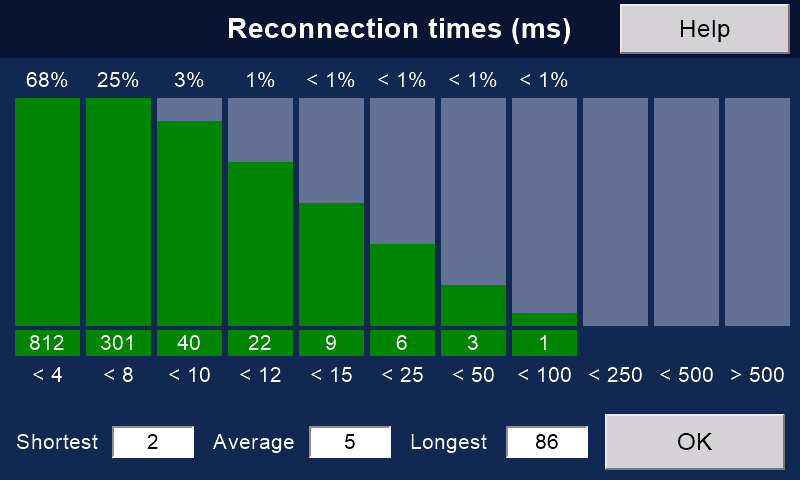
Reading it
Each column is one range of times in milliseconds (ms), written under it: '< 4' means under 4 ms.
The number under a column: how many reconnections took that long. Its coloured bar grows with it, full at 50 or more.
The per cent above a column: its share of all reconnections.
Along the bottom: the 'Shortest', 'Average' and 'Longest' times.
Green columns (under 100 ms) are normal. Amber (100 to 249 ms) and red (250 ms or more) are long gaps.
The longest time may have happened only once or twice, while most were far shorter. This can be reassuring news!
What is normal
Reconnections are usually extremely short with this system:
below 8 ms, and sometimes below 4 ms.
You only notice gaps above about 350 ms (a third of a second).
Many above 100 ms, or even 250 ms? Then consider moving the aerials, and check those on the receiver and on the transmitter for damage.
Why there are gaps
Many models hop between frequencies (FHSS) at the same time.
Collisions cannot be avoided, but they are brief: the system reconnects as fast as it can.
Not counted
- gaps that begin while the safety is on, with a Rotorflight model that has an arming channel;
- gaps while a V2 receiver is saving flight data.
The log still notes these two (with 'Keep log files' on).
Gaps while the 'PID (Rotorflight)' page is open are neither counted nor logged.
'Clear', on the Telemetry page, sets the counts back to zero.
They also start again a few seconds after each connection, and when you press 'OK' on the 'Rotorflight' page.
Still stuck?
See common questions, or write to mmessiter@gmail.com. Say which page, and what the screen showed.